![logo.svg]](https://help.singabusiness.com/hubfs/logo.svg)
You can manage your background music directly from the right panel on your main dashboard.
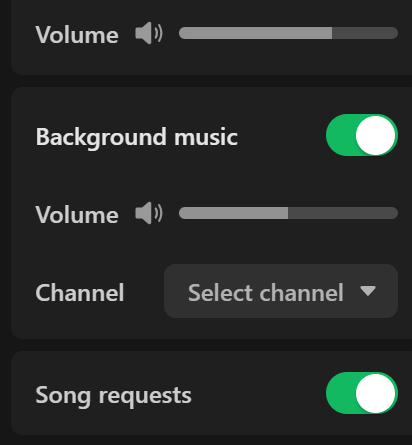
Controlling Background Music
- Background music toggle: Use the switch to turn the background music service on or off. When enabled, music will automatically start playing as soon as a karaoke track ends and will automatically stop when the next singer begins.
- Volume: Use the slider just below the background music toggle to adjust the volume independently from the main karaoke track volume.
Selecting a Channel Click the Select channel dropdown menu to choose a genre that fits the atmosphere of your venue. The available channels are categorized as follows:
- Light: Acoustic, Blues, Country, Hip Hop, Jazz, Pop, RnB, Soul
- Heavy: Alternative, Metal, Punk, Rock
- Theme: Christmas
- Finnish: Finnish Pop, Finnish Rock, Finnish Schlager, Finnish Christmas
If you can't find your answer, don't worry! You can chat with us by clicking the chat button in the bottom left corner. Outside our support hours, our Customer Support Bot will help you out in the chat!