![logo.svg]](https://help.singabusiness.com/hubfs/logo.svg)
How to change your venue’s address, location or opening hours
You can update your venue’s address, map location and opening hours yourself on the Admin page.
- Log in to the Admin page with your Singa Business credentials.
- Select Venues from the left menu and click the venue you want to edit.
- Make your changes and click Save in the top right corner.
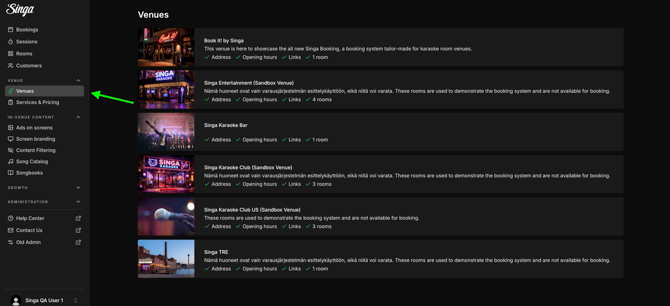
Address and map location
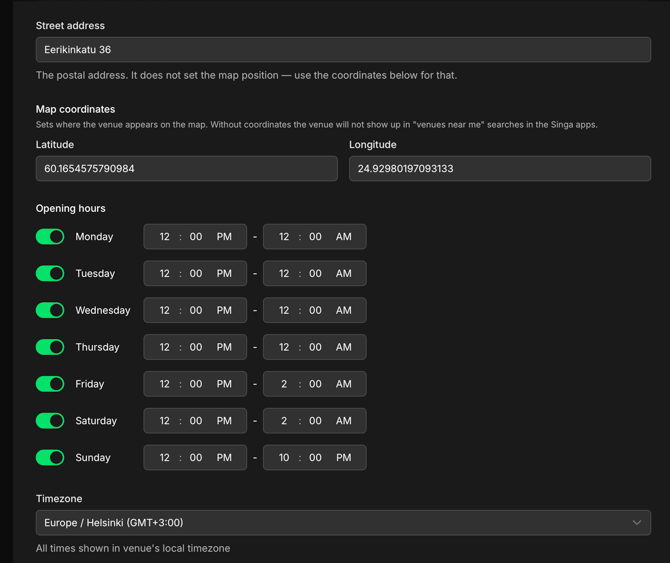
- Street address is the venue’s postal address. It does not set where the venue appears on the map.
- Map coordinates (Latitude and Longitude) set where your venue appears on the map. Without coordinates, your venue won’t show up in “venues near me” searches in the Singa apps.
Opening hours
Set the opening and closing times for each weekday under Opening hours, or mark a day as Closed. All times are shown in the venue’s local timezone. Updated hours are shown to customers and in the Singa karaoke venue list immediately.
If your venue’s location changes often
If your venue moves from place to place, for example if you’re a KJ or a mobile DJ, you can turn off Listed under Discoverability. Your venue is then hidden from public search in the Singa app, but customers can still reach it through a direct link.
If you can’t find your answer, don’t worry! You can chat with us by clicking the chat button in the bottom right corner, or email support@singabusiness.com. Outside our support hours, our Customer Support Bot will help you out in the chat!