![logo.svg]](https://help.singabusiness.com/hubfs/logo.svg)
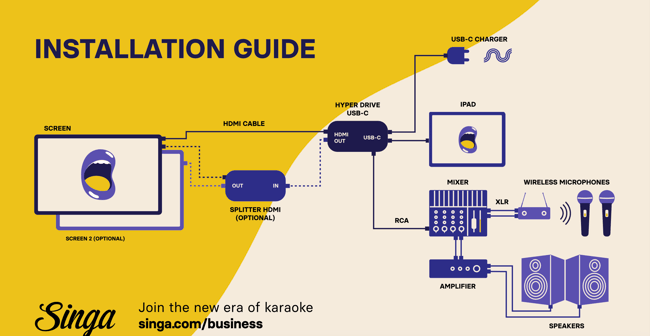
Requirements:
- An iPad and the Singa Pro App. This installation guide is aimed at more recent iPads, equipped with a USB-C charging port and no 3.5 mm headphone jack.
- While we still support iPads of the 8th and 9th generation, they came with the older Lightning charging port, not USB-C. These iPads will be the first in line to drop support in the not-so-distant future. We recommend getting a more recent model if you are anyway purchasing an iPad for this project. Please check the steps for installing iPads with an audio jack on this page.
- USB-C Hub or Dock with
-
HDMI output
-
USB-C charging
-
3.5mm audio jack
- It is advisable to choose reliable brands such as Hyperdrive, Satechi, and Belkin, as they offer models known to perform well. We have compiled a selection of recommended models for your convenience.
- Satechi Thunderbolt 4 Multimedia Pro Dock
- HyperDrive 4-in-1 USB-C Hub for iPad
- HyperDrive Dual Monitor Thunderbolt Dock
- HyperDrive Thunderbolt 4 Docking Station
- Belkin USB-C 7-in-1 Multiport Hub
- It is advisable to choose reliable brands such as Hyperdrive, Satechi, and Belkin, as they offer models known to perform well. We have compiled a selection of recommended models for your convenience.
-
- TV Screen(s) to display the lyrics and queue to the room
- Two speakers
- Mixer: multiple options - simple 4-channel analog mixers to digital mixer options.
- A high-wattage charger, as it will be powering more than just the iPad. 65W or higher will be able to carry the load.
- Two or more wired or wireless microphones
- Wired benefit: less risk for a positive feedback loop.
- Wireless benefit: a better experience for the singers
- Various cables (like RCA and HDMI cables)
Please note! The length of an HDMI cable can affect the quality of the transmitted signal. Signal losses can occur with distances over 10 meters/35 ft, which can cause degradation of image or sound quality. HDMI repeaters and extenders can strengthen the HDMI signal for longer distances. For professional longer-distance installations, we recommend that you contact your local professional AV company and use, for example, active HDMI fibre or CAT cables.
Here's an example of how to connect the Hyperdrive adapter