![logo.svg]](https://help.singabusiness.com/hubfs/logo.svg)
What’s the difference?
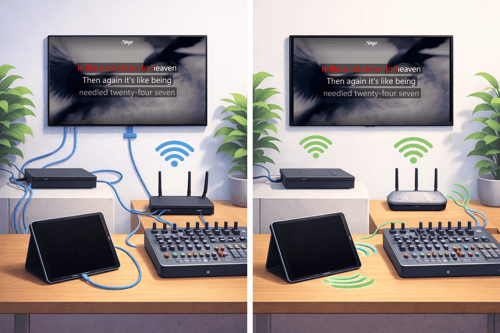
Wired connection (Ethernet / HDMI / Audio Cables)
A physical cable connects devices (e.g., iPad → router via Ethernet adapter, iPad → TV via HDMI).
Characteristics:
-
Stable and consistent
-
Lower latency (less delay)
-
Not affected by WiFi congestion
-
Requires cables and sometimes adapters
Wireless connection (WiFi / AirPlay / Bluetooth)
Devices connect wirelessly without cables.
Characteristics:
-
More flexible placement
-
Cleaner setup (fewer cables)
-
Can suffer from interference or signal drops
-
Higher latency risk
Wireless is often linked to:
-
Songs buffering or failing to load
-
Random app disconnects
-
Audio delay between lyrics and music
-
AirPlay randomly stopping
-
Sound cutting out via Bluetooth
Which one should you use with Singa?
For Singa Pro in professional venues (bars, karaoke rooms, restaurants)
Recommended: Wired connection whenever possible. This is the most stable and reliable option. It reduces buffering, prevents audio delay, and minimizes the risk of disconnections
Why?
-
Streaming karaoke requires stable internet
-
Prevents buffering and playback interruptions
-
More reliable during busy evenings
-
Reduces risk of audio sync issues
Best practice setup:
-
iPad connected to router via Ethernet adapter
-
HDMI cable directly to TV
-
Audio via mixer or sound system using cable (not Bluetooth)
This is the most stable and support-friendly configuration.
For smaller or casual setups
Wireless setups can work well in smaller or home environments with a strong and stable WiFi network. Wireless may be acceptable if:
-
The WiFi network is strong and stable
-
There are few devices using the network
-
The venue is small
-
No professional sound routing is required
However:
-
Avoid Bluetooth for main audio in professional setups (can cause delay).
-
Avoid AirPlay to TVs in commercial environments (can disconnect or lag).