![logo.svg]](https://help.singabusiness.com/hubfs/logo.svg)
What you'll need
- A computer or a laptop
- TV or other monitor and a connecting cable (HDMI cable and possible adapter)
- Speaker(s) or sound system
- Microphone(s), mixer and connecting cables (XLR cable)
- An internet connection. We recommend at least 20 Mbps. Singa Pro does not work in an offline mode or without an internet connection
1) Connect your computer to the external display:
- Connect the computer to the TV/other external display via an HDMI cable. Depending on the ports on your computer, you might need an adapter to connect the HDMI cable to your computer.
- After you've checked that your device has recognized the new screen, and is extending the screen successfully, you can head over to Singa Pro
- In the Singa Pro browser, click the "Cast to 2nd screen" and drag the pop up screen to the desired screen.
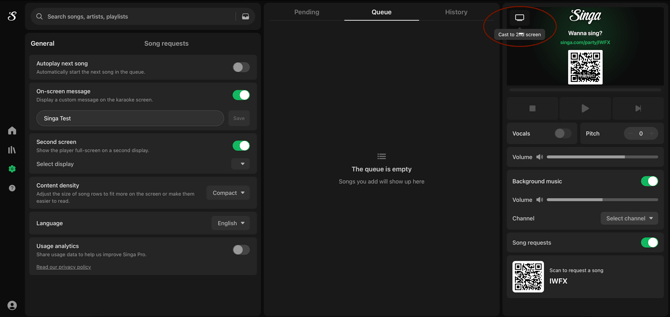
2) Connect the computer with a RCA cable to the mixer.
- The two-piece head (red + white) of the RCA cable is connected to the mixer and the one-piece head is inserted into the headphone jack of the computer.
3) Connect the sound from the mixer to the audio system / speaker.
- Often, this is done with an XLR cable, but depends on the audio equipment you use.
4) Connect the microphones to the mixer to their own channels using an XLR cable.
- Adjust the microphone volume through the mixer and make other sound adjustments, such as add reverb/echo.
And there we go! You are ready to rock n' roll.
If you can't find your answer, don't worry! You can chat with us by clicking the chat button in the bottom right corner. Outside our support hours, our Customer Support Bot will help you out in the chat!